

 19:37
19:37
 bama
bama

If you have a friend, family member, or co-work that you often e-mail creating an e-mail shortcut link on your Desktop orTaskbar can be a quick and easy way to e-mail them. To create an e-mail shortcut follow the below steps.
1. Right-click the Desktop or area you want to create the e-mail shortcut and select New and then Shortcut.
2. For the location or path to the shortcut entermailto:friend@example.com where friend@example.com is the e-mail address you want to use in the shortcut.
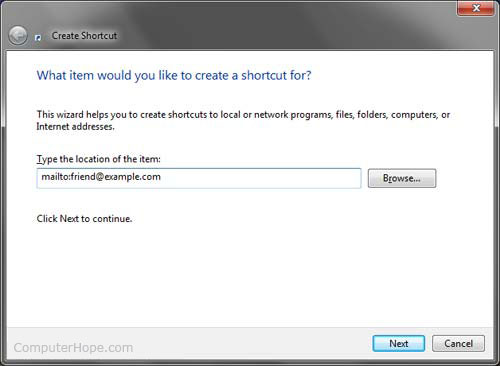
3. Click Next and then type the name of the Shortcut and clickFinish.
Now when this shortcut is clicked a new e-mail window will appear with that e-mail address already typed into the To field.
 If you're running Microsoft Windows 7, you can also pinthis shortcut to your Taskbar. If you already have your e-mail client pinned on the Taskbar right-clicking that icon will show your new pinned shortcut.


0 comments:
Post a Comment